
1.2. Keys in Detail
Jump to:
No content available.
Welcome!
This manual helps you to optimize the usage of the IP telephone in combination with the PBX. Please use this manual at initial operation. Some features differ from the features described in the manufacturer's documentation.
The following pages describe the Yealink T19P E2, T41P, T42G, T46G, T48G, T41S, T42S, T46S, T48S, T52S, T54S, T53, T53W, T54W, T57W, T46U system telephones.
 |  |  |
| Yealink T19P E2 | Yealink T41P Yealink T41S | Yealink T42G Yealink T42S |
 | |  |
| Yealink T46G Yealink T46S | Yealink T48G Yealink T48S | Yealink T52S |
 |  | |
| Yealink T54S | Yealink T53 | Yealink T53W |
| |  |  |
| Yealink T54W | Yealink T57W | Yealink EXP40 |
 |  |  |
| Yealink EXP50 | Yealink EHS36 | Yealink T46U |
| Type | Icon/Character | Description |
| NOTE
CAUTION
WARNING |  | NOTE: Information that is useful but not critical to the reader.
CAUTION: Tells the reader to proceed with caution.
WARNING: Stronger than CAUTION; means "don't do this" or that this step could be irreversible, e.g., result in permanent data loss. |
| TIP |
| Useful tips that provide additional information. |
| Procedure | 1. 2. 3. | Procedures are numbered steps to perform an action, where the order of the steps is relevant. |
| Result of procedure/action | ⇒ | Indicates the result of an action//procedure. |
| Lists | • • | Used for listings and items where the order of steps is irrelevant. |

No content available.
The device was produced in accordance with the most common security standards. Nevertheless, note the safety guidelines in order to use the device securely. Please note the following safety guidelines to lower risk of burning, electric shocks, and similar risks.
General guidelines
Keep the device dry and clean at transport, storage, and usage.
Avoid collisions and drops of the device at transport, storage, and usage.
Do not open the device case and do not try to repair the device on your own.
Guidelines for usage and operation
Check whether the power supply voltage is in accordance with the device's voltage.
Pay attention to dry hands before using a cable.
Do not spill liquids on the device.
Guidelines for cleaning
Disconnect and unplug the device from the power supply before cleaning.
Use a soft, dry, antistatic cloth to clean the device.
You have the option of voice encrypting (SRTP) your telephone calls. You can activate this function for your customer account via the administration portal at any time.
Activation of this function is subject to fees.
Activate the function on the administration portal.
Restart all telephones. Restarting may take a few minutes. During a conversation a lock icon on the telephone display indicates encryption is activated.
⇒The active call is now encrypted.
No content available.
In order to use this IP telephone with your telephone system you will need a sound broadband connection.
If you only have a single circuit plug available (e. g. in home offices) but would like to access the Internet with your laptop while using the phone, connect the laptop to the circuit plug on the phone.
All telephones you receive are preconfigured and connected to the telephone system.
Find further information on how to install an
extension in the administration portal manual.
No content available.
No content available.
Below you will see an overview over all keys of the respective models.
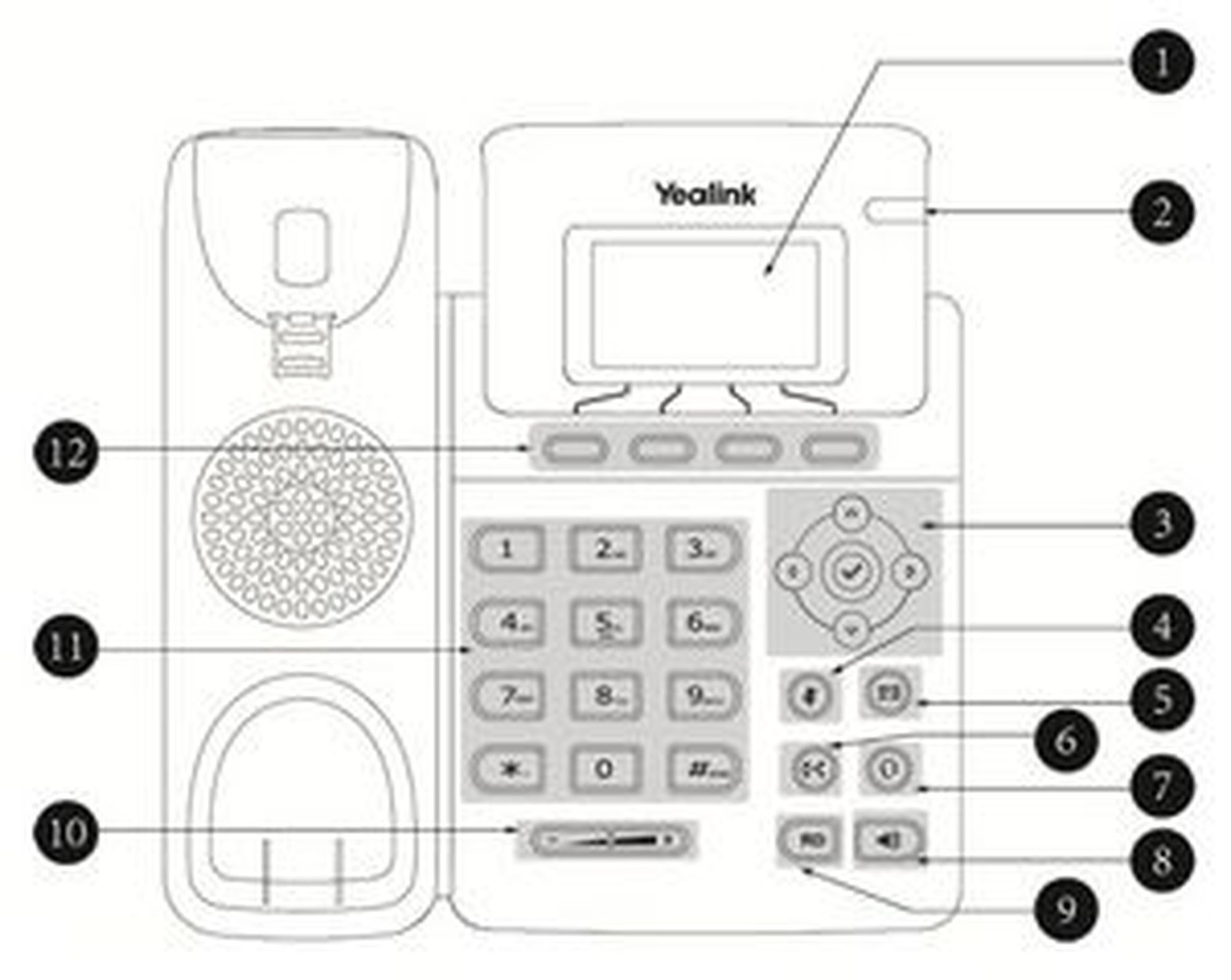
Yealink T19P E2
| Position | Description |
| 1 | LCD display |
| 2 | LED call indicator |
| 3 | Navigation keys |
| 4 | Mute key |
| 5 | Voice mail key |
| 6 | Transfer key |
| 7 | Headset key |
| 8 | Speaker key |
| 9 | Redialing key |
| 10 | Volume keys |
| 11 | Alphanumetrical key pad |
| 12 | Soft keys |
Yealink T41P, T42G, T41S, T42S
| Position | Description |
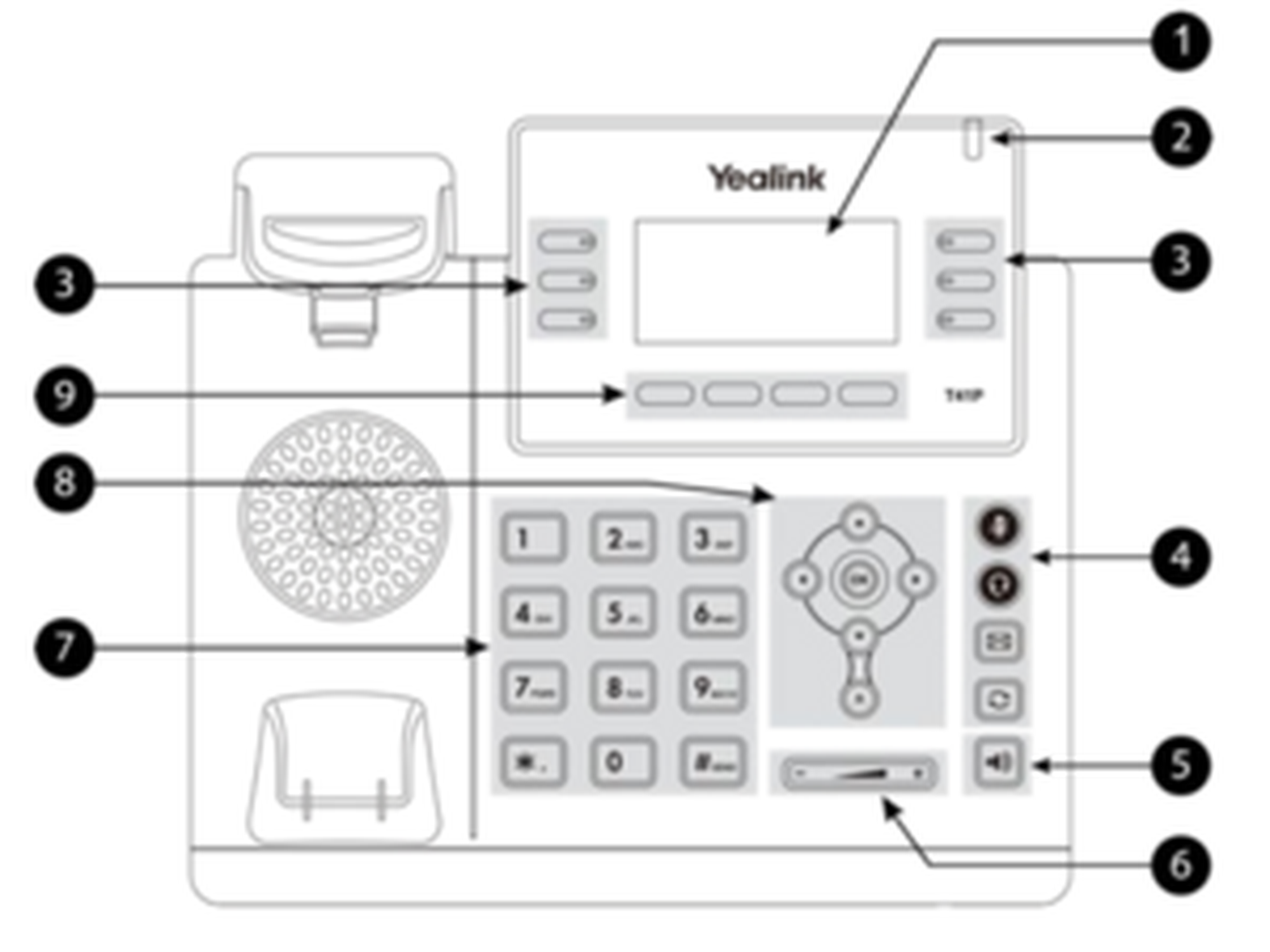
| 1 | 2,7" display |
| 2 | LED call indicator |
| 3 | Freely assignable function keys |
| 4 | Headset and mute key, keys for voice mail and redialing |
| 5 | Speaker key |
| 6 | Volume key |
| 7 | Alphanumerical key pad |
| 8 | Navigation keys |
| 9 | Soft key |
Yealink T46G, T46S
| Position | Description |
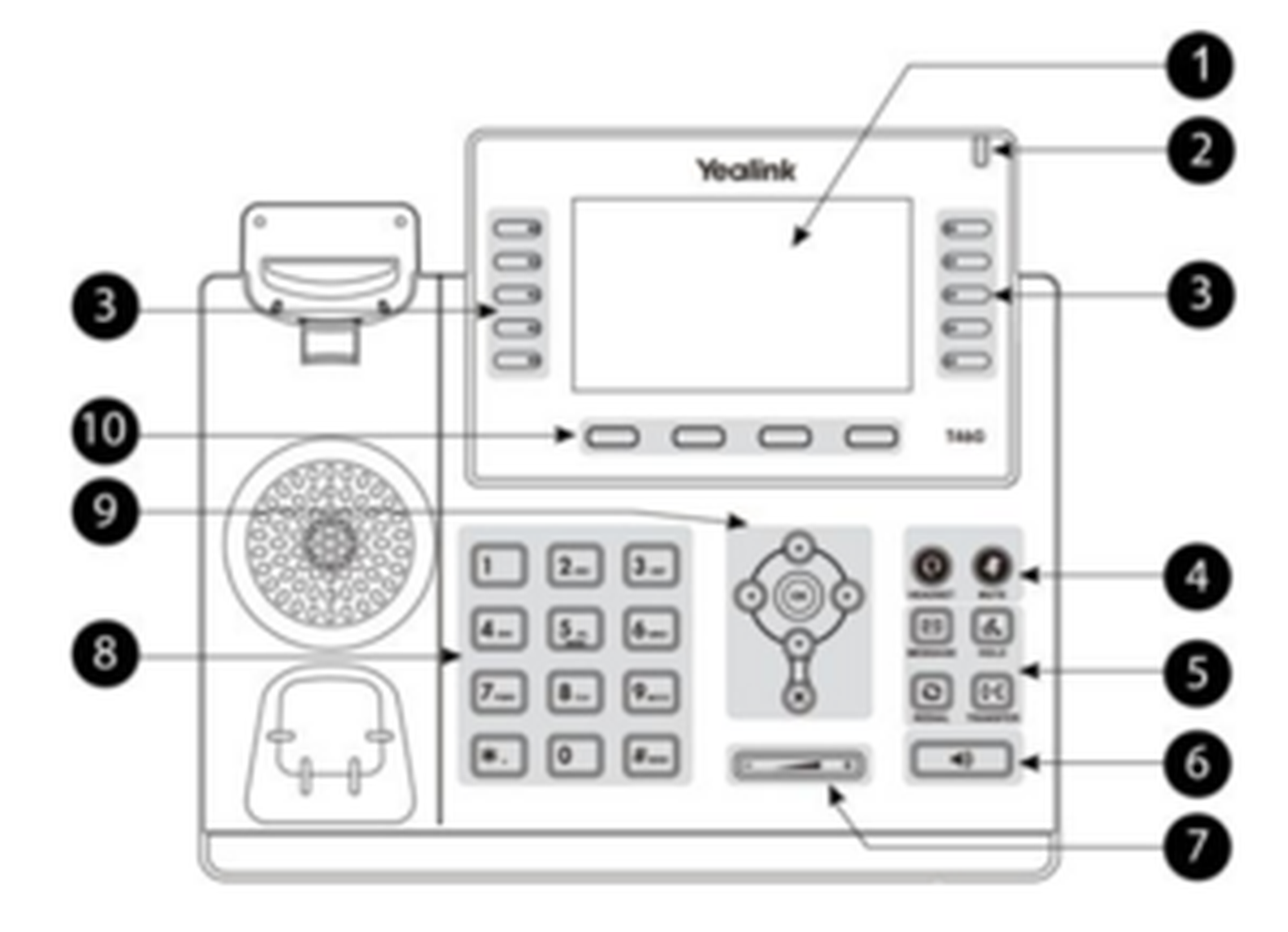
| 1 | 4,3" Display |
| 2 | LED call indicator |
| 3 | Freely assignable function keys |
| 4 | Headset and mute key |
| 5 | Keys for voice mail, hold, redialing and transfer |
| 6 | Speaker key |
| 7 | Volume key |
| 8 | Alphanumerical key pad |
| 9 | Navigation key |
| 10 | Soft key |
Yealink T48G, T48S
| Position | Description |
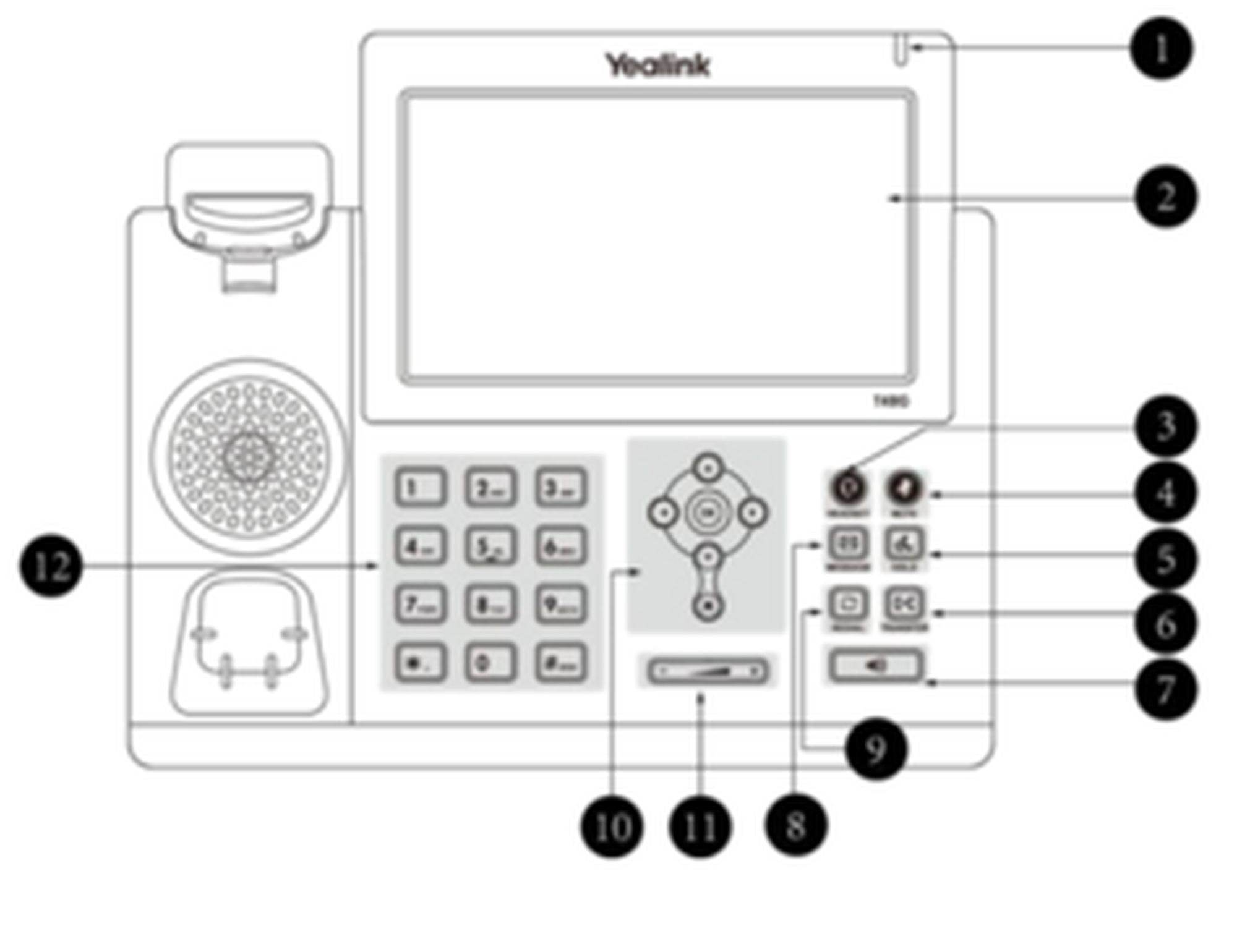
| 1 | LED call indicator |
| 2 | 7" touchscreen |
| 3 | Headset key |
| 4 | Mute key |
| 5 | Hold key |
| 6 | Transfer key |
| 7 | Speaker key |
| 8 | Voice mail key |
| 9 | Redialing key |
| 10 | Navigation keys |
| 11 | Volume key |
| 12 | Alphanumerical key pad |
Yealink T52S, T54S, T53, T53W, T54W
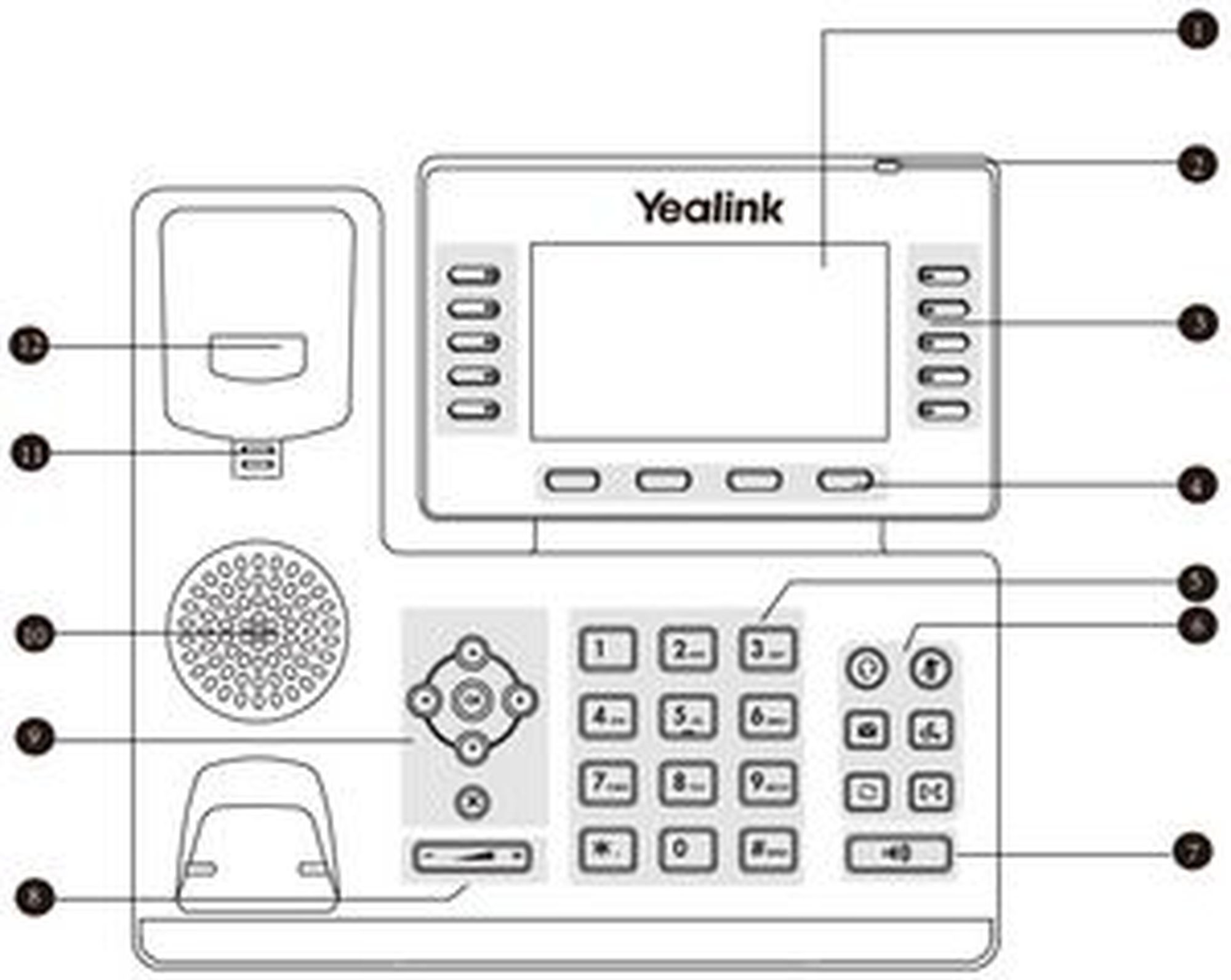
| Position | Description |
| 1 | LCD display |
| 2 | LED call indicator |
| 3 | Freely assignable function keys |
| 4 | Soft keys |
| 5 | Alphanumetrical key pad |
| 6 | Headset and mute key, keys for voicemail, redialing, hold and call forwarding |
| 7 | Speaker key |
| 8 | Volume key |
| 9 | Navigation keys |
| 10 | Speaker |
| 11 | Reversible tab |
| 12 | Hookswitch |
Yealink T57W
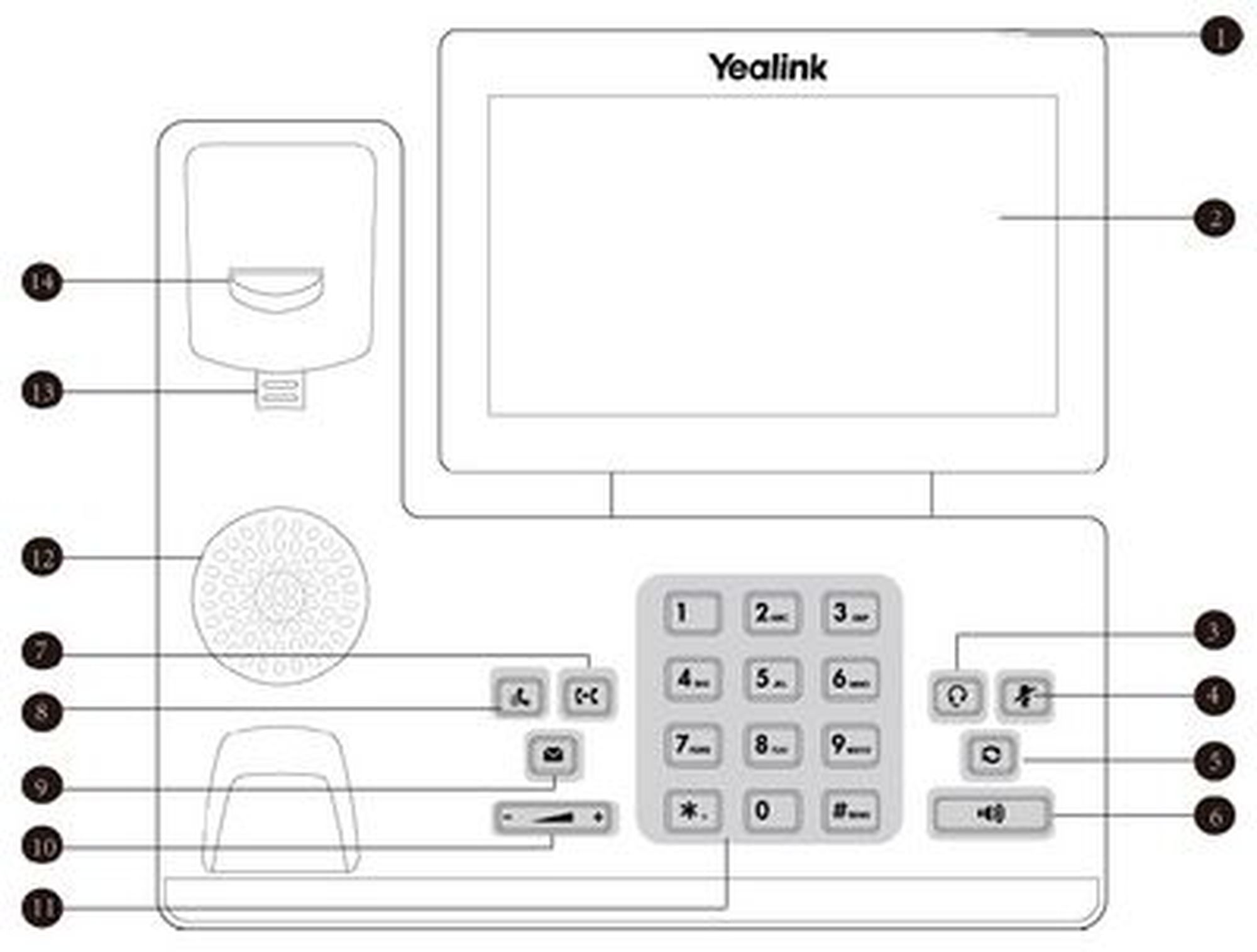
| Position | Description |
| 1 | LED call indicator |
| 2 | Touch screen |
| 3 | Headset key |
| 4 | Mute key |
| 5 | Redial key |
| 6 | Speakerphone key |
| 7 | Transfer key |
| 8 | Hold key |
| 9 | Voicemail key |
| 10 | Volume key |
| 11 | Alphanumetrical key pad |
| 12 | Speaker |
| 13 | Reversible tab |
| 14 | Hookswitch |
| 15 | (on the back side) USB2.0 port |
| Key | Description |
 | You can use the navigation keys to steer through the menu. On the initial page:
|
 | Adjusts the speaker's and telephone's volume |
 | Mutes the microphone |
 | Headset |
 | Calls voice mail |
 | Redialing |
 | Speaker |
 | Transfer* |
 | Hold Conversation |
| * not available for Yealink T41P and T42G |
Yealink T46G, T48G display icons
| Keys | Description | Keys | Description |
 | No network access |  | Redirect call |
 | Logged in successfully |  | Hold call |
 | Not logged in |  | Mute microphone |
 | Logging in |  | Silent (ringtone) |
 | Message |  | Key pad lock |
 | Do not disturb (DND) |  | Full mailbox |
Entering the extension number is sufficient when performing an internal call. If you choose to perform an external call, you have dial the exchange identification code (e.g. "9" for UK) prior to the external number.
Reciever
Pick up the receiver.
Enter the telephone number.
Confirm your call by pressing
 or the Send soft key.
End the conversation by pressing the soft key End Call,
 or hanging up.
 or hanging up.
Alternative:
Enter the telephone number.
Pick up the receiver.
End the conversation by pressing the End Call soft key,
or hanging up.
Speaker
Press the speaker key to activate the speaker.
Dial the telephone number.
Confirm your call by pressing
or the Send soft key.End the conversation by pressing the soft key End Call or
.
Headset
Activate the headset by pressing the headset key
 .
Dial the telephone number.
Confirm your call by pressing
or the Send soft key.End the conversation by pressing the soft key End Call or
.
 .
To answer an incoming call, you have the following options:
Pick up the receiver or press the speaker key
 to answer an incoming call. Press the headset key in order to answer with your headset.
End the conversation by hanging up, pressing the End Call soft key, pressing , or the headset key
(when using the headset).
 to answer an incoming call. Press the headset key
Call Waiting
The display of the telephone sends out a double knocking sound as soon as a second call comes in during an active conversation.
You have the following options:
You can take the incoming call by pressing the Answer soft key and set the active conversation on hold.
You can reject the incoming call by pressing the soft key Reject.
You can transfer the incoming call without taking it directly. Press the Transfer soft key or the transfer key
 *.
 *.
Incoming calls can only knock, if the the Call waiting indication (CWI) for the extension is activated. To enable CWI for your phone, select Call Waiting Indication in the menu under Call Settings.
Hold a Call
In order to hold an active call, press the Hold key or push the Hold button
 *.
To take an incoming call during an active conversation, press the Answer soft key. To reject an incoming call, press the Reject soft key. You can transfer incoming calls directly by pressing the transfer button
* or the Transfer soft key.
 *.
⇒The active conversation is now on hold.
Currently, it is not possible to access the central directory during a call on hold.
Toggle
To toggle between two callers, press the soft key Swap. You can further toggle between the conversations using the navigation keys and confirm your choice by pressing the Resume soft key.
⇒The active conversation is put on hold and the caller hears a waiting music.
* available only for T46G and T48G
Attended Transfer
Accept the incoming call by pressing the soft key Answer.
After taking the call, press the Transfer soft key or
*.Now enter the extension number.
Press
.Announce the incoming call.
To transfer the call, press the Transfer soft key or
*, then you can hang up.
Unattended Transfer
Press the Transfer soft key or
* during an active call.Enter the extension number.
Press
.Press the Transfer soft key or
*.Hang up.
When you want to perform a transfer during an active conversation follow the next steps:
Answer the call by pressing the Answer soft key.
Press the Transfer soft key or the Transfer button
*.Choose the line you want to transfer to.
Confirm with for
an attended transfer. Confirm with the Transfer soft key or the Transfer button * for an unattended transfer.
Blind Transfer
Do not take the incoming call.
Press the soft key Transfer or
*.Enter the number.
Press the Transfer / Send soft key or
*.Hang up to finalise the transfer.
When transferring a call that is on hold, you have the option to perform an unattended transfer by pressing the soft key Transfer, entering the number and press Transfer again. Perform an attended transfer by pressing the soft key Transfer, entering the number and pressing the  button.
* Only for T46G and T48G.
Call forwarding
You can configure various call forwarding scenarios. For this purpose you can use the call forwarding profiles.
Under the telephone menu you can only edit the default profle (catch all / always) to be found under the call forwarding profiles. You can edit the remaining call forwarding profiles via Ncontrol or via the administration portal. For more information, refer to the administration portal manual and the Ncontrol manual.
The following call forwarding options are available. You can activate or deactivate call forwardings via the telephone menu's call settings.
Permanent call forwarding (always)
All incoming calls will be forwarded directly to the predefined telephone number.
Forward if busy (busy)
New calls will be forwarded immediately, when coming in during an active call. This call forwarding option functions only, if the Call Waiting function is deactivated.
Delayed call forwarding (no answer)
Call forwarding condition: You do not answer the incoming call within a defined time period (timeout). The timeout can be set to 5, 10, 15 or 20 seconds. Where should the incoming call be forwarded after the specified time has elapsed? The caller receives a call waiting signal and is then forwarded to the defined destination.
If unavailable (not registered)
The option functions only if the end device is not registered to the telephone system:
When the Internet connection fails or there is no LAN connection.
and
If “call forwarding …if unavailable” is programmed for a direct extension (e.g. extension 123 - John Doe) and a caller calls the direct dial number for the extension directly, call forwarding applies. If the extension is a member of a queue or a group and the queue or group receives a call, call forwarding for the individual extension no longer applies! In general, the destination should always be an available destination number. I.e., make sure that no voicemail or announcement comes on.
Always depose
Always depose an available telephone number as target. Ensure that no voice mail or other announcement picks up automatically.
When disconnecting
When disconnecting the connection between the end device and the telephone system, it can take up to 60 seconds for the call forwarding to work. Once the end device is reconnected to the telephone system, it can take up to 60 seconds for it to register.
Call forwarding codes
Call forwardings can alternatively be activated through * codes:
| *10 | Activation of the call forwarding profile |
| *11 + destination | Permanent call forwarding to telephone number |
| **11 | Cancel permanent call forwarding |
| *12 + destination | If no answer after a specific time, delayed call forward to telephone number |
| **12 | Cancel delayed call forwarding |
| *13 + destination | If busy, forward to telephone number |
| **13 | Cancel call forwarding if busy |
| *14 + destination | Call forwarding if unavailable |
| **14 | Cancel call forwarding if unavailable |
Follow these steps to start a conference call:
Call the first participant.
Press the Conference soft key.
Dial the second participant's number.
Press
,  , the soft key Send or Conference.
As soon as the second party answers the call, press the Conference soft key once again to start the conversation with both participants.
 , the soft key Send or Conference.
You can split ongoing conferences to seperate calls with the soft key Split. Pressing the soft key Manage allows you to mute or remove participants.
A conference call with more than three participants is easily established via the administration portal: Please refer to the administration portal manual for more information.
The Do Not Disturb (DND) function rejects incoming calls automatically.(Incoming calls will be shows as "missed calls").
To activate the DND-mode on your telephone:
Push the DND soft key will enable the DND mode.
Your telephone is in DND mode as soon as the display shows either  or
 . If the DND mode is activated, the caller will be IMMEDIATELY transferred to the target of the call forwarding "after time".
The Completion of Calls on No Reply (CCNR) creates a callback in case a person cannot be reached (e.g. the person is not on its desk or busy) at the moment.
To use this function, the CCNR function has to be enabled in the administration portal and in the phone extension. Click on the CCNR check box under Administration / Profile to activate the function.
Activate a callback
A caller generates automatic connection establishment within the private branch exchange (PBX) to a previously busy party (only internally). If the the other party cannot be reached, the caller can use the callback function.
In order to activate the function, insert *5 into your key pad. An acoustic confirmation will finalize the activation.
As soon as the other party is available again, your end device receives a callback generated by the PBX. As soon as you answer the callback, the PBX sends out a call to the number you tried to reach initially.
Erase Callbacks
If the callback is no longer needed, all call backs can be erased by entering the **5 code into the key pad. An acoustic confirmation finalises the erase.
Initial Set-up
When accessing the voice mail system for the first time, set up your personal voice mail.
Press the message key on the telephone or dial the extension assigned by the administration portal to access the voice mail menu.
Then select “0 Mailbox Options” to set up your voice mail box.
Now press “1” to record a message in the event you are unavailable.
Now record your message and press “#” to end the recording.
Press “1” to accept the recording, “2” to replay the recording, and “3” to record a second time.
Access the voice mail
Press the Message key
 or dial *791 to access the voice mail.
Enter your extension you saved in the administration portal and your voice mail pin to access the voice mail options.
 or dial *791 to access the voice mail.
You can install your personal voice mail announcement for every extension via the administration portal. These files have to be in .mp3 or .wav format.
Send voice mail messages to your email account via the administration portal.
For more detailed information, refer to the voice mail leaflet.
The basic function of “Hot desking” allows cancelling the registration of existing users and registering new users to your end device. This function is useful when employees frequently change their work station but don’t take along their end devices. After completing registration, your configuration is automatically copied to the new telephone.
Step 1: Cancelling the registration of the current extension
Menu -> Phone settings -> Logoff -> Select
Step 2: Registering the new extension
Login -> Enter the extension number -> Submit -> Enter voice mail PIN -> Submit
Loggin in and off may take a few moments.
No content available.
You can use various features of the telephone system via the end device as well as via Ncontrol or the administration portal (also refer to the administration portal manual).
After pressing the Menu key you have the following options:
Call Settings
Call waiting indication: define whether this function should be activated.
(optional, depending on settings on the administration portal) Timeout: set the ringing time.
(optional, depending on settings on the administration portal) Intercom: the intercom function enables speaking directly to a linked extension through the system, without dial tone and ring tone.
Caller ID block: set your entire number to be shown to the party being called, the switchboard number to be displayed or all caller ID information to be blocked.
Call forwarding: activate the function Call forwarding
Parallel call: configure another telephone or your mobile phone to ring in addition to your telephone when a call comes in. You can then answer the call with one of the two telephones.
Call forwarding: profiles
Here you can select your preconfigured call forwarding profiles.
For details, please refer to the Ncontrol manual.
You can edit the default profile directly via your device.
For details, please click here.
Telephone settings
Automatic redialling
Suggests number (if necessary, remove function)
Ring tone
Define as primary device
Logoff
Queues
Queues can be enabled or disabled; for set-up see administration portal manual)
You can alter the configuration of the freely assignable function keys via ncontrol.nfon.net under Configurations - Function Keys. Alteration is also possible via the administration portal. Long names will be displayed in abbreviation.
Yealink T52S, T54S
You can save up to 12 (T52S) or 16 function keys (T54S) on three levels on your telephone.
Additional function keys can be configured via the EXP50 expansion module.
Yealink T41P, T42G, T46G
You can save up to 15 or 27 function keys (T46G) on three levels on your telephone.
Yealink T48G
You can alter and save up to 29 functions on your display. All keys will be displayed at once when pressing the DSS key on your display. Further freely assignable function keys can be configured via the extension module EXP40 (only available for T46G and T48G).
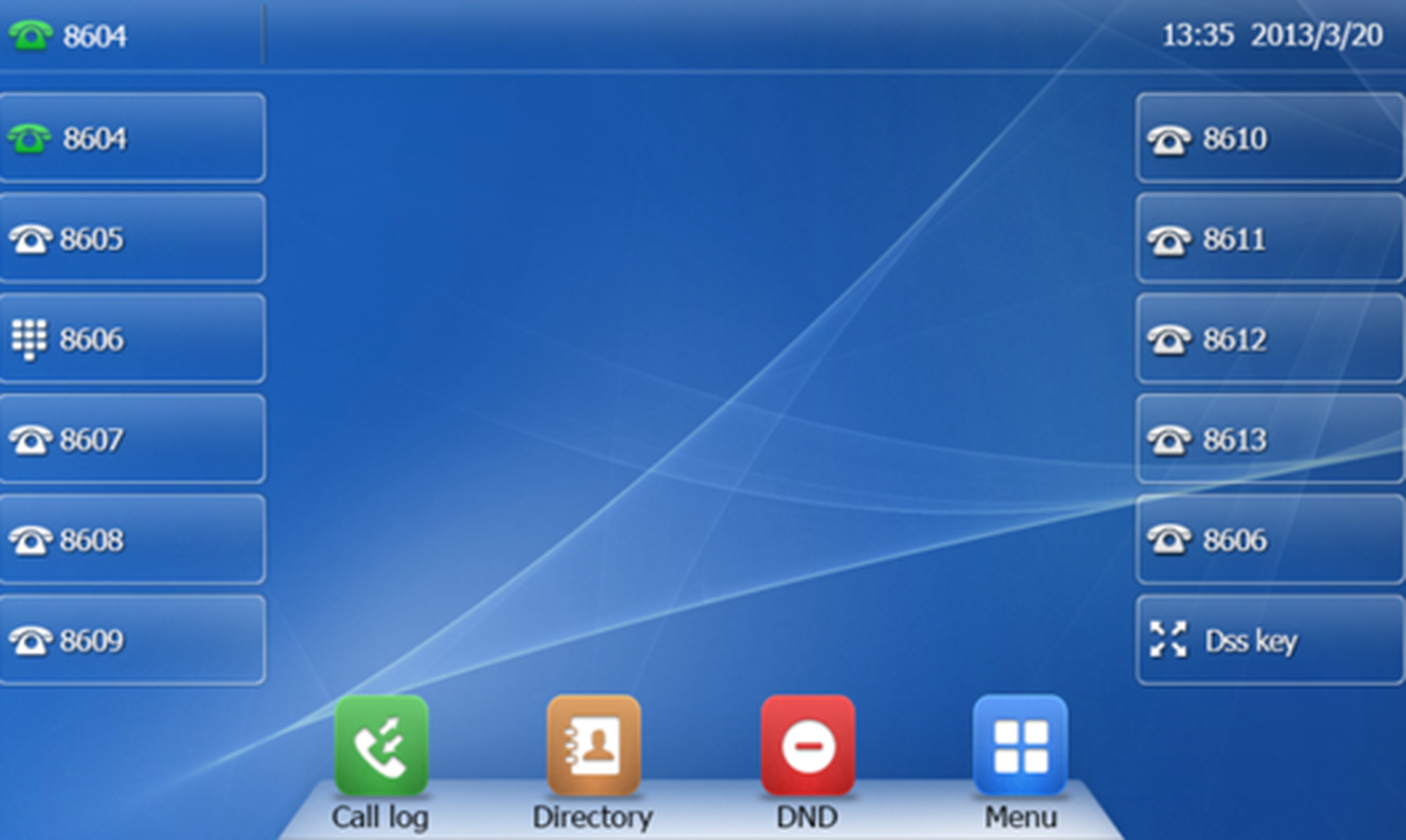
Extension / telephone number
You can add any extension or telephone number to the busy lamp field.
You can start a call by pressing the respective busy lamp key. If an internal extension is programmed, you can see whether that extension is currently busy:
If the LED next to the key flashes, the party receives a call.
If the LED is consistently lit, the party has answered a call and is currently busy.
If the LED next to the respective key flashes, you can take the call by pressing the respective key next to the flashing LED.
Intercom
You can add any extension in the PBX system and then use this function key to directly communicate with this extension through the intercom. The other party must have the intercom activated on their device. Intercom refers to a conventional intercom system (similar to walkie-talkies) directly connecting you to the other party’s speaker by pressing the assigned function key.
Additional functions via * codes
Entering various codes (as listed on the following page) allows you to additionally program functions such as call transfer to the keys.To do so, simply enter the code with the desired number in the entry field.
Control codes allow direct access to the telephone system’s functions. The following codes apply:
| Code | Description |
| **## | Restart devices, only for snom devices! |
| #+n | Use outside line "n" to call the telephone number ("n" replaces the “0” otherwise required to access an outside line) |
| *1 | Start and end voice recording (if this function is enabled for the extension) |
| *10+profile number | Activation of the call forwarding profile |
| *11+TN | Permanent call forwarding to telephone number (TN) |
| **11 | Cancel permanent call forwarding |
| *12+TN | If not available, forward to telephone number (TN) |
| **12 | Cancel call forwarding if no answer |
| *13+TN | If busy, forward call to telephone number (TN) |
| **13 | Cancel call forwarding if busy |
| *14+TN | If not registered, forward to telephone number (TN) |
| **14 | Cancel forward if unregistered |
| *2+Speed dial | Directly dial the extension/telephone number via speed dial |
| *3 | Pick up the last call ringing in the pick-up groupe |
| *3+EXT | Pick up call coming in to the extension (EXT) |
| *490 | Activate call waiting |
| **490 | Deactivate call waiting |
| *5 | If busy, automatic callback activated |
| **5 | If busy, automatic callback deactivated |
| *55 | Specify primary device within a premium extension (Premium Package) |
| *72+nnnn1 | Call skill service nnnn |
| *73+nnnn1 | Call eFax additional costs will occur |
| *74+nnnn1 | Call time control nnnn |
| *75+nnnn1 | Call group nnnn |
| *76+nnnn1 | Call announcement nnnn |
| *77+nnnn1 | Call queue nnnn |
| *78+nnnn1 | Call conference service nnnn |
| *791 | *791 Access voice mail for this extension with password *791158 Access voice mail for extension 158, with the password for 158! *11*791 Transfer your calls to your voice mail *11*791158 Transfer your calls to the voice mail of the extension 158 |
| *792 | Access voice mail entering extension number, e.g. for remote enquiry |
| *80 | Activate intercom |
| **80 | Deactivate intercom |
| *80+NST | Intercom to extension (EXT) |
| *84+nnnn1 | Become member of the queue with service ID nnnn |
| **84+nnnn1 | Leave queue with service ID nnnn |
| *85 | Echo extension |
| *86 | Block caller ID (CLIR) |
| *860 | Show main number as telephone number |
| **86 | Show telephone number incl.direct dial (CLIP) |
| *87 | Subscribe to Skill-set |
| **87 | Unsubscribe to Skill-set |
| *9+Project Number | Define a project number for outbound calls. (Note: The project number is only valid for the very next outbound call) |
| Function codes for conference rooms during an active conference. | |
| ** | Help |
| *2 | Activate or deactivate mute. |
| *3 | Express your needs. |
| *5 | Activate or deactivate mute of all participant. |
| *6 | Lock the conference. |
| 1) nnnn is the four digit Service ID with leading zeros (0). For example, in a callgroup, IVR, eFax, etc. This means: is the Service ID "1", "0001" must be entered when entering the function code. | |
No content available.
You need your phone's IP address for example for configuration of the CTI client.
Press
in the idle screen to have your IP address, MAC address and firmware displayed.The IP address of the T57W can be found by pressing "MUTE" and then "Status".
Where can you get help?
You can use various sources for help concerning your issues. Please use them in the order suggested here:
| Telefónica Germany GmbH & Co. OHG Georg-Brauchle-Ring 50 80992 München
| 24h-Hotline: +49 800 22 111 22 |
| o2online.de/business | Benefit from numerous advantages with o2 Business now. Discover our individual offers, solutions and services that are tailored to your specific needs - ideal for large and medium-sized companies. |
| admin.digitalphone.o2business.de | Here you can manage your extensions, virtual faxes and services (e.g. conference rooms). Also you can create new devices and edit existing ones. |
| Chat for existing customers | New service for you. Use our live chat exclusively You can reach our chat: Monday - Friday 8:00 a.m. - 6:00 p.m |